Understand what your kids are really watching
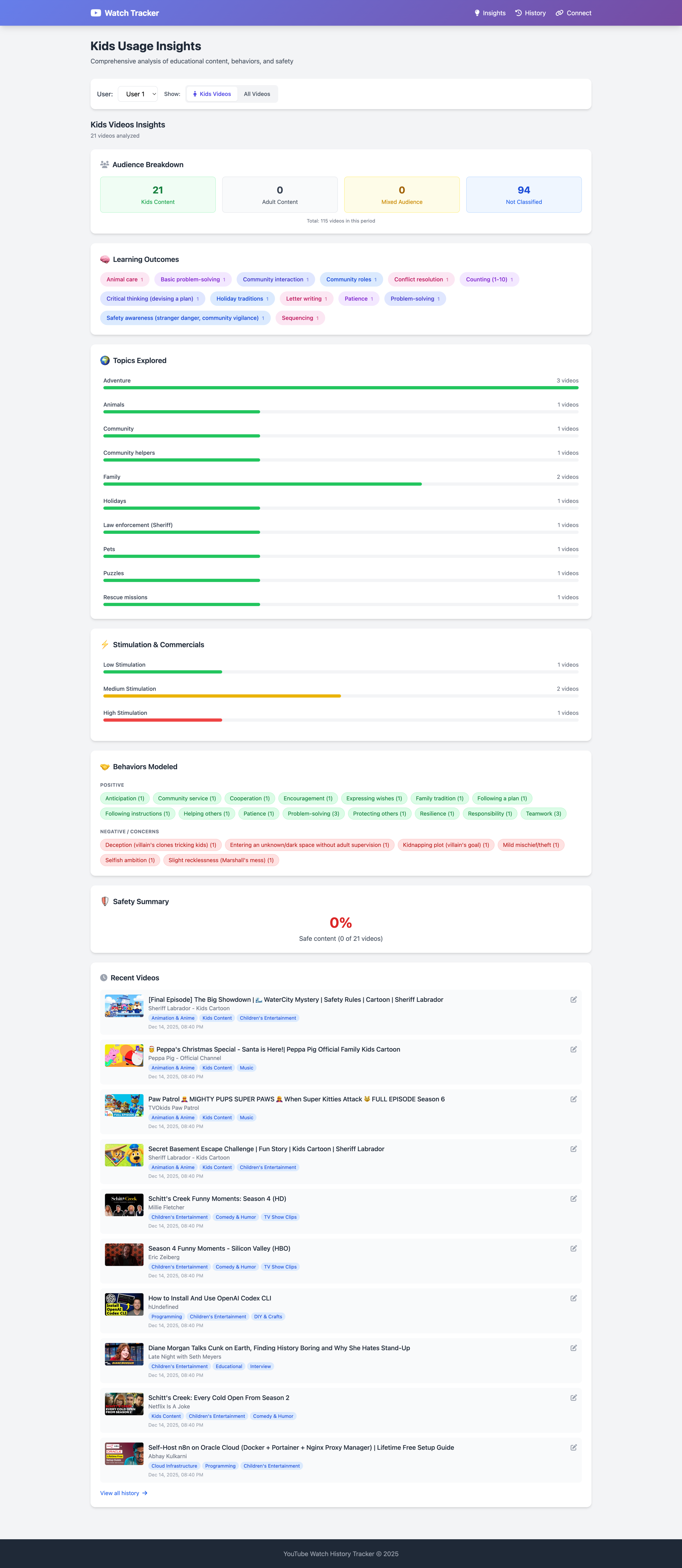
Learning Outcomes
See exactly what they're learning. We tag videos with skills like "Problem Solving", "Letter Writing", and "Community Rules".
Behavioral Analysis
Monitor the social behaviors modeled in content. Track positive traits like "Teamwork" versus concerns like "Rudeness".
Stimulation Levels
Avoid overstimulation. We categorize content by pacing and intensity so you can manage screen time quality.
Install our extension on a Chromium browser (Chrome, Brave, etc.) and create an account at whatismykidwatching.com. Press Sync History in the extension or on the site to upload your YouTube watch history, which we then analyze and classify.Because of YouTube's interface limits, syncing must be triggered manually.
You can manually correct any video classification in your dashboard. Right now we support YouTube watch history only.
Busy parents who want a clear, AI-driven view of what their kids are watching without digging through history themselves. Parents have told us that they have found this valuable for kids from toddlers to mid-teens.
Yes. You can sync history from any device, but the extension must be installed in a browser to collect YouTube history.
Insights page is dedicated to kids video related insights. If Insights page is empty it means that your account is not being used to watch kid videos.
The first 14 days are free. After that, your subscription costs about the price of a coffee per month so you can understand what your kids watch and connect with them better.
Start understanding today
- No credit card required
- Instant analysis
- Private & Secure